Best 3D Design Software for Architecture and Visualisation

3D software began to develop in the late 1980s, driven by tech enthusiasts who had access to powerful computers capable of running volumetric images. These technologies were initially used mainly in the film industry to explore new cinematic possibilities.
At the same time, other industries, such as industrial design and computer gaming, also contributed to the development of this new type of software.
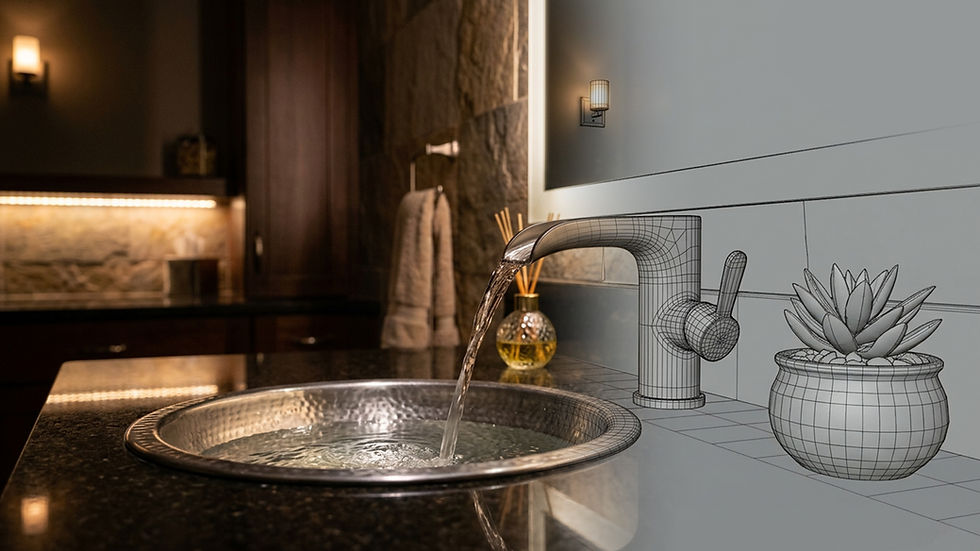
Fast forward to today, and these capabilities have expanded into fields like architecture and design. There are now many powerful 3D software programs available that can generate highly realistic renderings.
The industry has advanced so much that some 3D software is completely free to use, allowing almost anyone to enter the rendering field with minimal investment.
At the same time, modern hardware performance enables real-time rendering, making it possible to create realistic images with little to no waiting time.

Key Takeaways
3D design software has evolved from niche tools in the 1980s into powerful, widely accessible solutions used across multiple industries
There are different types of software (CAD, freeform, rendering, real-time), each designed for a specific stage of the workflow
Modern tools can produce highly realistic 3D renderings, even in real time
Free and open-source software like Blender and Unreal Engine make 3D design accessible with minimal investment
Choosing the right software depends on workflow, project type, and desired level of realism
What Is 3D Design Software?
3D design software is a powerful type of computer program that combines multiple functions, including 3D modelling, texturing, lighting, and rendering. These elements work together to create final images or video content.
Depending on the intended use, the output can be applied across many industries, such as architecture, engineering, film, and video games.
These programs are highly dependent on hardware performance. The more powerful the computer, the more complex and realistic the results can be, as modern 3D workflows rely on advanced technologies.
Main Types of 3D Design Software
There are three main types of 3D software: CAD, free-form, and hybrid/general-purpose tools. Each serves a different purpose and operates differently.
3D CAD software
This type of software is highly technical and precise, designed to help engineers and architects create accurate models of buildings, machines, and structures.
These programs can simulate physical properties such as strength, movement, resistance, and energy behavior. However, they are not intended for photorealistic rendering or cinematic output.
Instead, they are used to produce technical drawings and 3D models that can be used for manufacturing, construction, or engineering processes.
3D freeform softwares
Freeform software uses different methods of representing shapes in 3D space, often based on virtual surfaces or meshes. These tools offer a completely different workflow and user experience compared to CAD software.
They are widely used in industries such as visual effects, film, product design, gaming, and marketing visualisation.
3D sculpting softwares
These programs are designed for creating organic shapes in a digital environment. Artists typically use a stylus or digital pen to sculpt forms such as characters, animals, or complex surfaces.
A well-known example is ZBrush.
3D texturing software
Texturing software is used to apply colours, materials, and surface details to 3D models.
It works similarly to painting, but in a 3D space, allowing artists to create realistic surface effects. A popular example is Substance Painter.
3D general software
These are complex, all-in-one programs that can handle multiple stages of the workflow, including modelling, texturing, animation, rendering, and basic simulations.
While they are not as specialised as dedicated tools, they are extremely versatile and widely used in architectural visualisation, product design, and gaming.
Popular examples include 3ds Max, Maya, and Blender.
3D rendering software
There are also specialised tools focused on rendering and visualisation. This category is currently one of the most influenced by AI technologies.
In these programs, users import ready-made models and enhance them with textures, assets (such as trees, cars, and people), lighting setups, and rendering presets.
These tools are commonly used to create high-quality images and animations. Popular examples include Lumion and Twinmotion.
Free 3D software
Many 3D programs are available as open-source or free solutions, offering impressive capabilities.
Blender is one of the most well-known free tools, capable of handling nearly every stage of the 3D workflow.
Another important platform is Unreal Engine by Epic Games. It is a powerful real-time rendering solution used for creating cinematic content, games, and interactive experiences. Its capabilities are extensive and continue to expand.
Best 3D Software for Architects and Designers
The best software for architectural visualisation belongs to the “all-in-one” category, general 3D programs such as Blender, Maya, and 3ds Max.
These are often combined with specialised rendering tools like Unreal Engine or rendering plugins such as V-Ray or Corona.
For example, our workflow typically involves modelling in Blender and then transferring the scene into Unreal Engine for rendering and presentation.
Best 3D Rendering plugins for Photorealistic Results
These plugins can be used with software such as 3ds Max, Maya, Rhino, Cinema 4D, and Blender.
Chaos Corona
One of the best choices for still-image realism in architectural visualisation. Corona is designed specifically for archviz workflows, focusing on natural lighting, soft shadows, and realistic materials. It is especially strong for interior renderings and fast look development.
Chaos V-Ray
A powerful, all-around professional renderer used across many 3D platforms. V-Ray offers high flexibility, advanced control, and consistent photorealistic results, making it a reliable choice for complex projects.
D5 Render
A strong real-time rendering solution that comes close to offline quality. D5 offers real-time path tracing, accurate lighting, and fast iteration, making it ideal for client presentations, animations, and exterior scenes.
Octane
Octane delivers excellent photorealistic results, particularly for artists looking for GPU-based speed and cinematic visuals.
While it may not be the default choice in traditional architectural workflows, it is a strong option for those prioritising speed and visual impact.

How to Choose the Right 3D Design Software
Choosing the right software depends primarily on your workflow, experience level, and budget.
Industry-standard tools like Autodesk 3ds Max may offer advanced capabilities, but they also require investment.
All software comes with its own advantages and limitations. Today, with the help of AI, many users can achieve realistic results regardless of the tool they choose.
Ultimately, the most important factors are ease of use, workflow compatibility, and how efficiently the software helps you achieve your goals.
We are Renderistic, a rendering and interior design studio from Timișoara, Romania. Since 2018, we've been helping architects, developers, and designers across Europe and beyond visualize their projects with photorealistic 3D renderings, interior design, office fit-out, and virtual tours. Ready to bring your next project to life? Let's talk →


Comments